Use a reaction to respond to an existing message without composing a separate reply. For example, use Like to acknowledge a message or Celebrate to respond to good news.
Add a Reaction
1.Find the message you want to react to in the selected conversation.
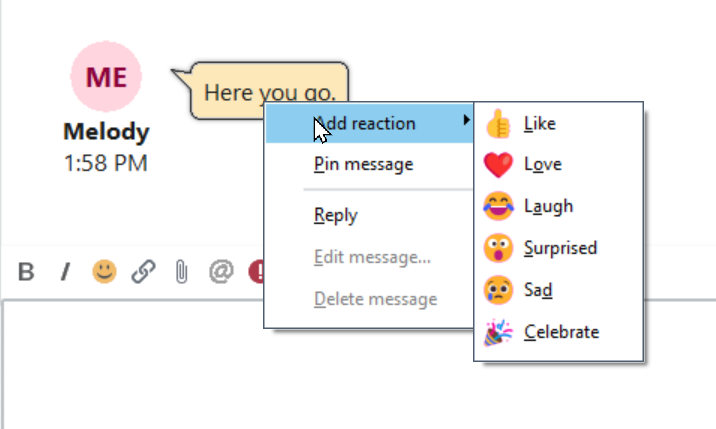
2.Right-click the message and point to Add reaction.
3.Select a reaction from the submenu.
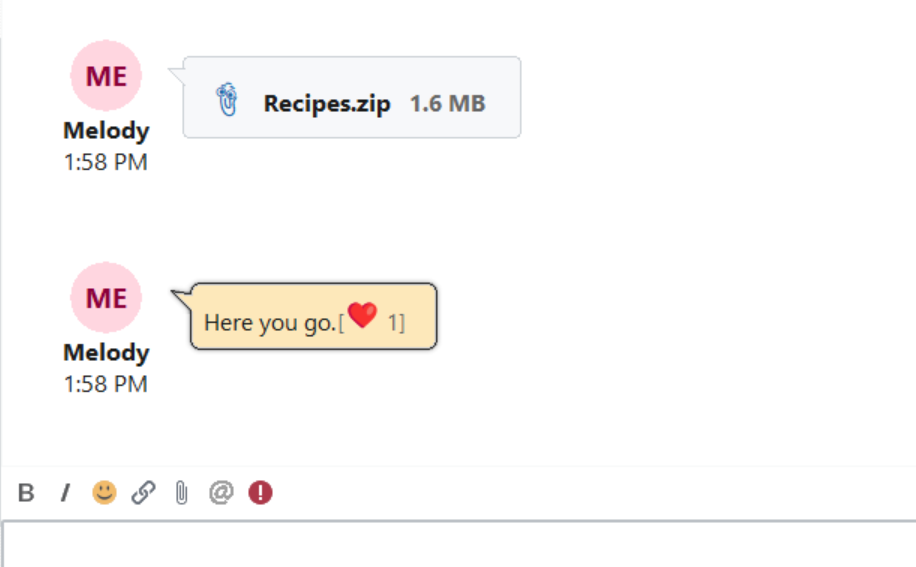
Your reaction appears with the message. You do not need to click Send.
Available Reactions
•Like — Acknowledge a message or show approval.
•Love — Show appreciation.
•Laugh — Respond to something amusing.
•Surprised — Express surprise.
•Sad — Express sadness or sympathy.
•Celebrate — Celebrate good news or an achievement.
Reaction Counts
A reaction is displayed as an emoji with a number indicating how many users have added that reaction to the message. For example, a heart followed by 1 indicates one Love reaction.
Reactions and Emojis
A reaction is attached to an existing message. To include an emoji in a new message you are composing, use the smiley face button above the message editor. See Using Emojis.