Use Preferences to customize your profile, startup options, notifications, and chat behavior. Click OK to save your preferences, or Cancel to close the window without saving changes.
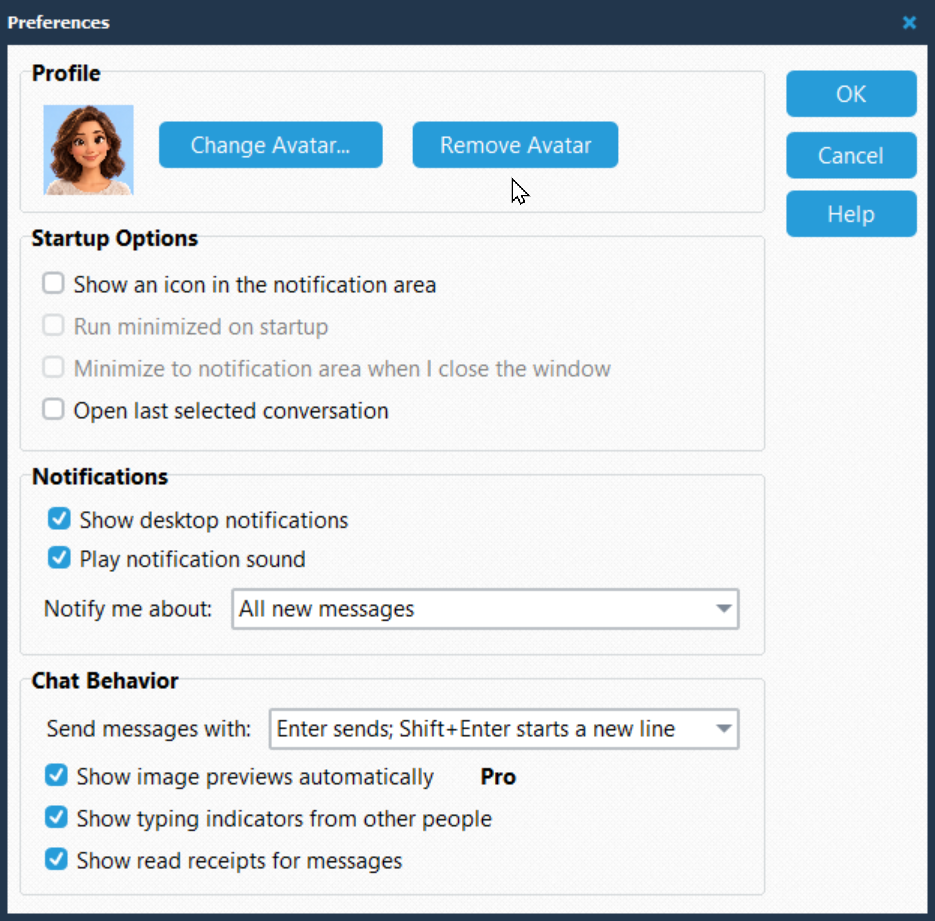
Profile
Change Avatar... lets you choose a profile picture. Remove Avatar removes your current picture.
Startup Options
Show an icon in the notification area displays a PhonePad Chat icon in the Windows notification area.
Select Show an icon in the notification area to enable the following two options.
Run minimized on startup starts PhonePad Chat minimized.
Minimize to notification area when I close the window keeps PhonePad Chat available in the notification area when you close its window.
Open last selected conversation opens the conversation you last selected when PhonePad Chat starts.
Notifications
Show desktop notifications displays notifications for messages.
Close after x seconds automatically closes the notification after a number of seconds.
Play notification sound plays a sound for notifications. Play the default sound or select a sound to play.
Notify me about controls which messages trigger notifications:
All new messages sends notifications for every new message.
Mentions and urgent messages only sends notifications when someone mentions you or sends an urgent message.
Urgent messages only sends notifications only for urgent messages.
Chat Behavior
Send messages with controls the keyboard shortcut used to send messages:
Enter sends; Shift+Enter starts a new line is the default. Press Enter to send, or Shift+Enter to add a line.
Ctrl+Enter sends; Enter starts a new line lets you press Enter to add a line and Ctrl+Enter to send.
Show image previews automatically displays image previews automatically. This option requires PhonePad Chat Pro.
Show typing indicators from other people lets you see when someone else is typing.
Show read receipts for messages displays Sent and Read indicators on your outgoing messages in one-to-one conversations. Clear it to hide both indicators. Group conversations do not display these indicators.
Appearance
Theme displays a theme you select, changing the appearance of the application.