|
Introduction |

|

|
|
|
Introduction |
|
|
Introduction
|
Introduction |
|
|
|
|
Introduction |
|
|
The purpose of this guide is to show you how to set up PhonePad for Remote Mode.
At this point you may be thinking "what is Remote Mode"? To explain this we should first have a look at Local Mode.
Local Mode
Local Mode is the standard way of setting up PhonePad. When you install PhonePad using the setup program (PHONEPAD4SETUP.EXE), PhonePad is by default installed to run in Local Mode. PhonePad on your workstation connects to the PhonePad database located in a shared folder somewhere on your network.

On a Local Area Network (LAN) or Wide Area Network (WAN), the PhonePad database will be in a shared folder on your file server. On a Peer-to-Peer network, the PhonePad database will be in a shared folder on your Host computer. In both scenarios, the PhonePad database is being accessed using file mode, much like you'd access any other file stored in a shared folder. Although in this case the database engine allows simultaneous multi-user access.
Remote Mode
You may have heard of Remote Mode by its other name: Client/Server. Remote Mode (or Client/Server) operates a bit differently. Instead of connecting directly to the PhonePad database like you do with Local Mode, PhonePad instead connects to the PhonePad Server application (DBServer). This is done via TCP/IP as opposed to file mode.
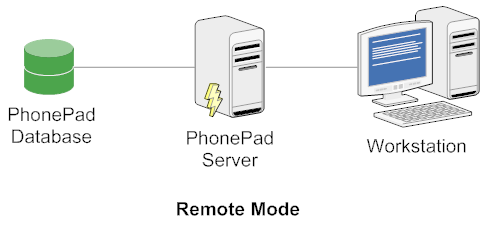
There is no direct connection between workstations and your PhonePad database. All connections are handled by the PhonePad Server. There are a number of advantages to this approach:
| • | Improved response times. Direct file mode access can slow performance due to multi-user of the Windows file sub-system. |
| • | Reduced data corruption. In Local Mode a workstation crash can corrupt your PhonePad data, requiring a repair. The chances of this happening in Remote Mode are virtually nil.* |
| • | Easier Administration. If you need to upgrade or repair your PhonePad database, all users need to be logged out of PhonePad. This can be a problem with Local Mode as you need to contact each user and ask them to log out. With Remote Mode it's easy - you can just get the server to disconnect all users instantly. |
* Corruption can occur if the server machine itself crashes, however, the same thing can happen in Local Mode.